

How to verify a DOI for academic research integrity
Unsure how to verify a DOI? This guide offers a step-by-step checklist to confirm your citations, avoid AI hallucinations, and uphold academic integrity.
Write with structure in Clarami AI
Editor-first AI drafting, citations, and two Workflows for student writing.
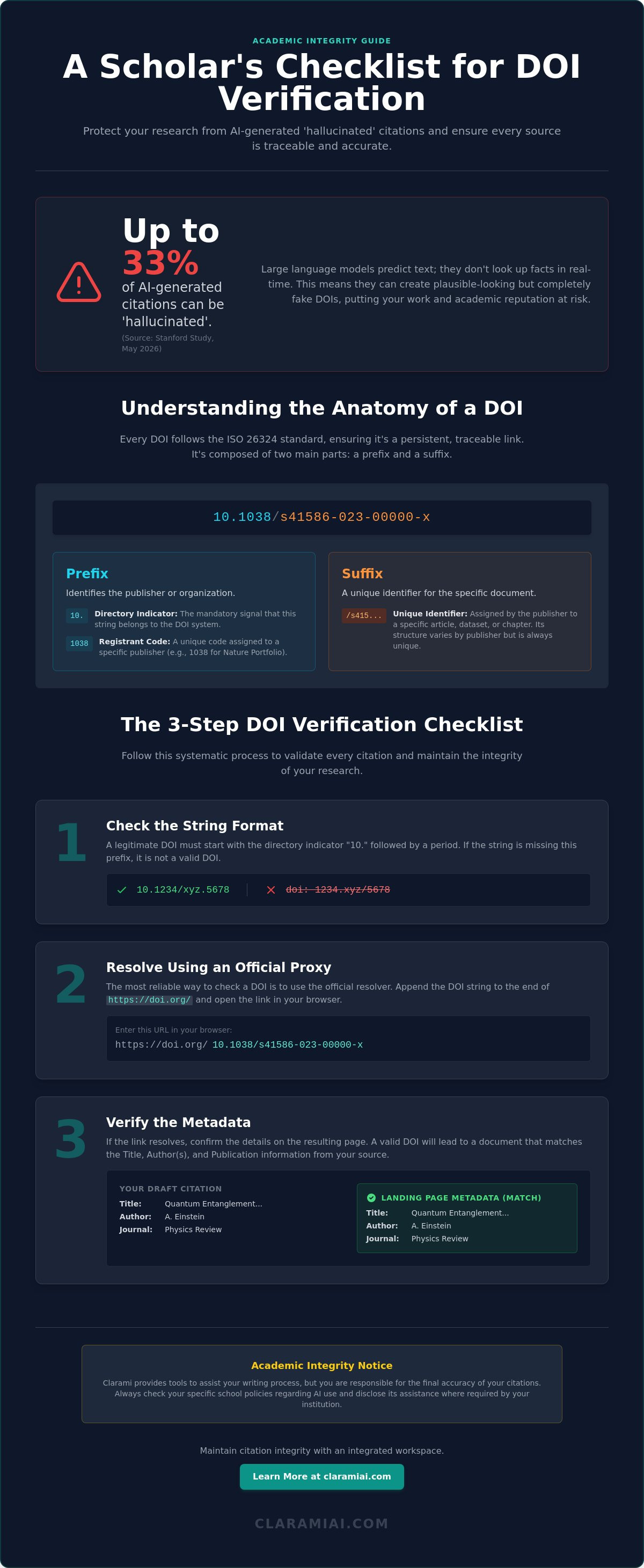
What if one out of every three citations in your draft didn't actually exist? A May 2026 Stanford study revealed that even specialized research AI tools can hallucinate information in up to 33% of queries. This reality creates a significant burden for scholars who must balance speed with the rigors of academic integrity. You likely feel the pressure to maintain absolute accuracy while managing a growing list of digital sources. Learning how to verify a doi is no longer just a technical skill; it's a critical defense against accidental plagiarism and structural inaccuracies in your work.
This guide provides a systematic checklist to help you validate digital object identifiers and ensure your research citations are accurate and traceable. We will explain the anatomy of a DOI and provide a reliable method to check your sources against official resolvers. By following these steps, you can move from a state of disorganized material to a polished, verified output with confidence.
Academic Integrity Notice: Clarami provides tools to assist your writing process, but you're responsible for the final accuracy of your citations. Always check your specific school policies regarding AI use and disclose its assistance where required by your institution.
Key Takeaways
- Verification provides a safeguard against AI hallucinations, ensuring every claim is anchored to a persistent, traceable source.
- Understanding the ISO 26324 standard helps you recognize legitimate DOI structures, specifically the mandatory "10." directory indicator.
- Learn exactly how to verify a doi using official resolvers and metadata search tools to confirm the landing page for any digital object.
- A systematic checklist simplifies the validation process by checking string formatting and resolving links through an official proxy.
- Integrated tools like the Clarami Citation Generator help maintain organizational cohesion by keeping verified sources connected to your workspace.
Table of Contents
- The role of DOI verification in academic integrity
- Understanding the anatomy of a DOI
- Primary methods to verify a DOI
- The DOI verification checklist
- Maintaining citation integrity with Clarami
The role of DOI verification in academic integrity
A Digital Object Identifier (DOI) serves as a permanent, digital fingerprint for scholarly work. Unlike a standard URL that can break when a website reorganizes, a DOI provides a persistent link to the source. This system ensures that your citations remain reachable for years to come. Maintaining this link is a core requirement for scholarly honesty. It allows peers to trace your logic back to the original evidence; without this traceability, the structural integrity of your argument collapses. Understanding how to verify a doi is the first step in protecting the validity of your research.
Verification is the final, non-negotiable step in the research process. You must confirm that every identifier in your bibliography actually resolves to the intended document. Because a Digital Object Identifier is a standardized string, it carries a sense of authority that can be easily mimicked. Relying on unverified strings puts your academic reputation at risk. To better understand this concept, watch this helpful video:
### Why you cannot rely on AI-generated linksLarge language models operate on probability, not real-time database lookups. They predict the next likely character in a sequence based on patterns found in their training data. While an AI might generate a string that looks like a legitimate DOI, it is often a "hallucination." It creates a plausible-looking prefix and suffix that leads to a dead link, a broken redirect, or an entirely different paper. A May 2026 Stanford study found that even specialized research tools can fabricate information in up to 33% of queries. This is why learning how to verify a doi is a mandatory skill for the modern student. You cannot assume that a generated citation is grounded in a real scholarly record.
The consequences of unverified citations
Submitting a paper with "hallucinated" DOIs can lead to charges of academic misconduct. Even if the error was unintentional, peer reviewers, dissertation committees, and academic departments view fake citations as a breach of trust. It suggests a lack of diligence in your methodology. This is where the human-in-the-loop approach becomes vital. While tools like the Clara AI Assistant can help you draft sections, you remain the final editor. You are responsible for anchoring every claim in primary sources. Verifying your DOIs ensures that your work stands up to the scrutiny of the academic community.
Academic Integrity Disclaimer: Always check your institution's specific policies regarding AI use and disclose its assistance where required.
Understanding the anatomy of a DOI
To master how to verify a doi, you must first understand its structural logic. Every DOI follows the ISO 26324 standard, which was updated in 2025 to clarify case-sensitivity and metadata procedures. This standard ensures that the identifier remains functional across different platforms. A DOI isn't just a random string of text. It's a structured code divided into two primary parts: the prefix and the suffix. This predictable architecture is what allows digital systems to resolve the link to a specific, permanent location.
The prefix always begins with "10." This is the directory indicator. It signals to the resolver that the string belongs to the DOI system. Following this is the registrant code, a four-digit or five-digit number assigned to publishers or research organizations. For example, the prefix 10.1016 usually indicates a publication from Elsevier, while 10.1111 identifies Wiley. These numbers are fixed for each organization. The suffix follows the prefix, separated by a forward slash. This part is unique to the specific object, such as a journal article or a dataset. While the official DOI Handbook allows for flexible suffix creation, most publishers use a consistent internal logic to generate them.
Identifying the prefix and suffix
Visualizing the breakdown helps clarify the syntax. Consider the string: 10.1038/s41586-023-00000-x. The "10.1038" portion is the prefix. "10." is the directory indicator, and "1038" is the registrant code for Nature Portfolio. The remaining portion, "/s41586-023-00000-x," is the unique suffix assigned to that specific paper. Some suffixes are journal-specific, incorporating volume and page numbers. Others are entirely random strings generated by a publisher's internal database. Regardless of the suffix format, the prefix remains the anchor for the entire identifier.
Common variations in DOI formatting
You'll encounter DOIs in several different formats. Modern standards prefer the URL format: https://doi.org/10.1038/s41586-023-00000-x. This makes the identifier immediately actionable as a clickable link. Older papers might only list the raw DOI string, such as doi:10.1038/s41586-023-00000-x. You may also see shortDOIs. These are abbreviated versions of long, complex strings, often formatted as "doi:10/abcde". While these are valid, they are less common in formal bibliographies. If you're unsure if a string is real, knowing the anatomy is the first step in learning how to verify a doi before you include it in your draft.
Maintaining this level of detail is easier when your tools support structured workflows. Using the integrated Clarami workspace allows you to manage these identifiers alongside your prose. You can create a free account to access an editor that prioritizes source integrity and structural cohesion.
Primary methods to verify a DOI
Once you recognize the structural components of an identifier, you must confirm its functionality. Testing the link is the only way to ensure your bibliography remains robust and professional. The process of how to verify a doi involves checking the string against global registries to see if it resolves to a live landing page. If the link fails, you've likely encountered a typo or a fabricated source from an AI assistant. You have several tools at your disposal to perform this check with precision.
The official DOI resolver
The most direct validation method is the official proxy resolver at doi.org. This system is the global standard for resolution. In December 2025, the proxy resolver passed the 3 billion monthly resolution mark, demonstrating its reliability for researchers worldwide. To use it, simply paste your DOI string into the search box on the homepage. If the identifier is legitimate, the site will redirect you immediately to the publisher's landing page for that specific object. If you see a "DOI Not Found" message, it's a clear signal that the identifier is invalid. While server downtime is possible, it's rare. A failure usually indicates a structural error in the string. When you find a working link, you can confidently integrate verified ai citations into your final draft to maintain scholarly standards.
Using Crossref for metadata verification
Crossref is the primary registration agency for scholarly publications. By the end of 2025, they had registered approximately 177 million DOIs. Their metadata search tool is a powerful asset when the resolver confirms a link exists but you need to verify the content. You can search by the DOI to see the registered title, authors, and publication date. This step ensures that the metadata matches your notes exactly. If you are missing a DOI for a known article, you can also search by the title or author in their database to retrieve the correct identifier. This cross-referencing eliminates the risk of citing the wrong version of a paper or a retracted work.
Beyond these primary tools, you can use specialized academic databases to verify identifiers. PubMed, Scopus, and JSTOR often include DOIs in their indexing records. If a manual search in these databases doesn't surface the identifier, you should treat the source with extreme caution. Maintaining this level of scrutiny is easier when you use an integrated workspace. The Clarami workspace allows you to manage these verified sources without the friction of constant copy-pasting, keeping your research synthesis and verification in one logical flow.
The DOI verification checklist
Verification requires a disciplined workflow. It serves as the final barrier between a disorganized draft and a submission-ready paper. By following a structured process, you ensure that every identifier in your document is functional and accurate. This checklist provides a reliable method for how to verify a doi independently, protecting you from the technical inaccuracies common in automated drafts.
- Identify the directory indicator. Every valid DOI must begin with the number 10 followed by a period.
- Resolve the string. Use an official proxy to see if the link leads to a live scholarly record.
- Audit the metadata. Confirm the article title, publication year, and authors match your source material.
- Authenticate the host. Ensure the landing page belongs to a reputable publisher or repository.
- Secure the link. Save the verified URL in your bibliography manager to maintain organizational cohesion.
Step-by-step validation procedure
Start by scanning for common formatting errors. Extra spaces, missing periods, or swapped characters in the suffix will cause a resolution failure. If a link resolves to a 404 page, don't assume the paper is gone; the publisher might have updated their internal database without updating the DOI metadata. You should also be vigilant about chatgpt fake citations. These hallucinations often use real publisher prefixes but fabricate the unique suffix. Cross-referencing the suffix against the publisher's site is the only way to detect these sophisticated errors.
Troubleshooting unverified DOIs
Sometimes a DOI is valid but the metadata is incorrect. This happens when publishers reuse suffixes or make clerical errors during registration. In these cases, use the Crossref search tool to find the correct identifier for your paper. If a DOI remains unresolvable despite your best efforts, you may need to use a stable URL (SURL) or a permalink as a fallback. However, a SURL should only be used if a DOI has not been assigned to the work. Maintaining this level of accuracy is easier when you work within an integrated environment. You can sign up for Clarami to access a workspace that keeps your sources and drafts connected, reducing the risk of citation drift.
Academic Integrity Notice: Check your school's specific policies and disclose AI use where required.
Maintaining citation integrity with Clarami
Verification is most effective when it's a core part of your writing process. Standalone checks often feel like a secondary chore, but an integrated editor ensures your citations remain anchored to your prose from the first draft to the final submission. Learning how to verify a doi becomes a seamless task when your workspace prioritizes structural integrity. The Clarami in-app editor eliminates the need to jump between browser tabs; it keeps your verified sources directly alongside your document to prevent organizational drift.
Selection-level edits allow you to refine specific paragraphs without losing the connection to your primary data. You can rewrite a complex argument or adjust the tone of a section while the citation helper ensures the supporting DOI remains accurate and functional. For students working with mentors, suggest-mode provides a transparent way to collaborate on source verification. Your advisor can review your claims and their supporting identifiers within the same workspace, ensuring every reference meets the rigorous standards of professional and scholarly labor.
Grounding your research in reality
The Clara AI assistant is specifically designed to work with your unique library of materials. By using the PDF Manager, you can organize your primary sources and their associated identifiers in one logical location. This methodical approach prevents the "hallucination" problem found in general-purpose tools. Instead of predicting a likely string of text, the workspace surfaces the real, verified data you've collected. This eliminates the common copy-paste errors that often lead to broken links or incorrect metadata in disorganized drafts. It's a grounded approach that respects your intellectual agency.
Finalizing your verified bibliography
Once your synthesis is complete, the Clarami Citation Generator automates the final formatting with calm assurance. It pulls the verified metadata directly into APA, Chicago, or MLA styles with precision. You can export your work to DOCX or LaTeX with the confidence that your reference list is traceable and accurate. This systematic order transforms a collection of disorganized notes into a polished, academic output. It's a purpose-built solution designed for the specific requirements of the modern researcher.
While these tools provide a structured foundation for your work, the final responsibility for accuracy lies with you. Perform a final review of all AI-assisted drafts before you submit your paper. Always check your school's specific policies on AI use and disclose its assistance where required by your institution.
Academic Integrity Notice: Clarami provides tools to assist your writing process, but you're responsible for the final accuracy of your citations. Check your specific school policies and disclose AI use where required.
Strengthening your research foundation
Precision in academic labor requires more than just gathering data; it demands the substantiation of every claim. By mastering how to verify a doi, you ensure your citations remain traceable and functional for peer reviewers and future scholars. You now have a systematic checklist to identify prefix structures, resolve links through official proxies, and cross-reference metadata with agencies like Crossref. These steps protect your work from the structural inaccuracies and hallucinations common in general-purpose AI outputs.
Clarami provides a purpose-built environment to maintain this level of accuracy. Used by researchers worldwide, our workspace features a source-grounded AI assistant and integrated citation management to keep your drafts connected to real data. You can start your verified research project with Clarami today to build a bibliography with confidence.
Academic Integrity Notice: Clarami tools support your writing process, but the user is responsible for final accuracy and submission. Check your institution’s policies and disclose AI use where required. Your commitment to verification is what transforms a simple draft into a rigorous scholarly contribution.
Frequently Asked Questions
What should I do if a DOI doesn't work?
Learning how to verify a doi involves checking for transcription errors such as extra spaces or swapped characters if a link fails to resolve. You should then search the article title directly in the Crossref metadata database to see if a different identifier is registered. If the official resolver still returns an error, the publisher's website may provide a stable permalink as a temporary alternative for your bibliography.
Can an AI tool generate a fake but working DOI?
A hallucinated DOI will almost never lead to a legitimate landing page because AI models often predict plausible prefixes but fabricate the unique suffix. This makes it essential to understand how to verify a doi by resolving it through an official proxy like doi.org. If the link doesn't lead to the specific article you intended to cite, you have encountered a fabrication that must be removed from your draft.
How do I find a DOI for an older printed article?
You can find DOIs for legacy print articles by using the Crossref metadata search or searching academic databases like JSTOR and PubMed. Many publishers have retroactively assigned identifiers to their back catalogs to meet modern digital standards. If a search by title and author yields no results, you should use a stable URL or a standard print citation to ensure your references remain accurate and traceable.
Is a DOI the same thing as a URL?
A DOI is a permanent identifier, whereas a URL is a location based address that can change over time. While a URL might lead to a 404 error if a journal moves its website, a DOI remains fixed. It acts as a digital fingerprint that always directs you to the current location of the paper through a global resolver service, providing superior structural integrity for your citations.
Does every academic article have a DOI?
Not every article has a DOI, especially older works or those from very small publishers. Registration requires a specific fee and technical infrastructure that some smaller organizations might lack. If an identifier is unavailable, use the most stable link possible. Integrated tools like the Clarami PDF Manager can help you organize these various source types without losing the connection to your primary data or methodology.
How do I cite a DOI in APA style?
Cite a DOI in APA style by including it as a functional URL at the end of your reference entry. The correct format is https://doi.org/10.xxxx/xxxxxx with no period at the end of the link. This ensures the identifier is immediately clickable for your readers. Using a citation helper within your workspace can automate this process, pulling verified metadata directly into the required format for your final submission.
Related on Clarami
- Best AI writing tool for students (full guide) →
- AI academic integrity checklist →
- Clarami pricing: Free vs PRO vs Platinum →
- Editor vs ChatGPT for writing →
- Export DOCX, PDF, and hand-in checklist →
- How to outline a paper →
- Prompt to structured essay draft →
- Revise with AI on a selection →
- Sign up free →
- Clarami home →
- More guides on the Clarami blog →