
Clarami
Write papers your reviewers can trust.
Your draft, your sources, and every citation in one workspace — so every claim links back to the page it came from.



Built for academic writing. Every claim traceable before you submit.
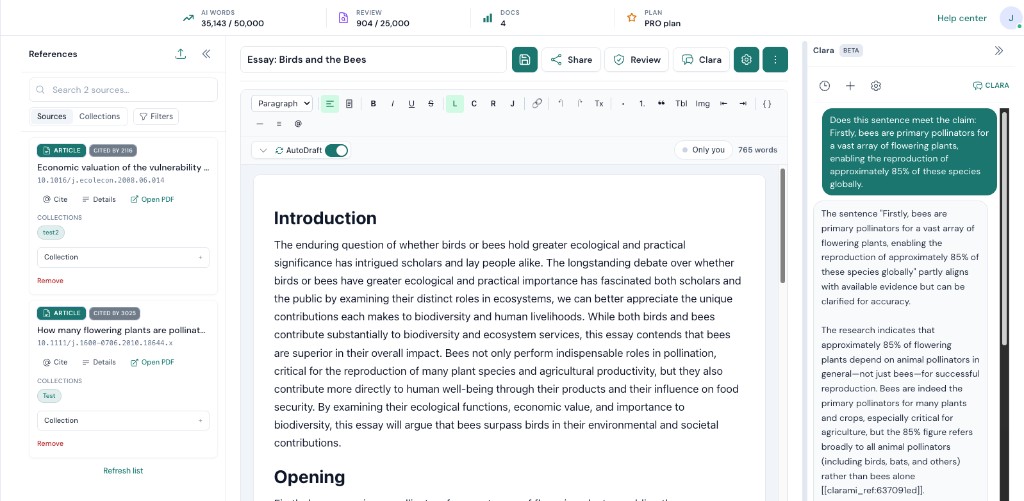
See the workspace: writing editor, source library, and citation tools in a single view.
How it works
Three steps from scattered notes to a finished, cited draft
01
Gather your sources
Upload PDFs, pull references from Zotero or Mendeley, or search academic databases directly inside Clarami. Your whole source set, in one place before you write a word.
02
Write with evidence already in the room
As you draft, Clarami's AutoDraft suggestions stay tied to your working sources. Clara, your AI research assistant, helps you compare findings and surface relevant passages — without leaving the document.
03
Cite, verify, and export with confidence
Insert citations in APA, Chicago, Harvard, IEEE, or Vancouver. Use ClaimShield to check each claim against its source. Export a clean DOCX, PDF, or LaTeX file when you're ready.
Core features
Not a chat app with writing bolted on.
Clarami is a purpose-built research workspace. Drafting, sources, and citations are structurally connected — not separate tools you switch between.
Traceable citations
Every drafted claim links back to its exact source passage
Clarami connects what you write to the page and paragraph it came from. Evidence checks take seconds, not hours of re-reading.
Supported citation styles: multiple styles, including APA 7th, Chicago, Harvard, IEEE, Vancouver, and journal-specific formats.
Clara in your workspace
An AI assistant that knows your sources, not just the internet
Ask Clara to compare findings across your uploaded papers, unpack a methods section, or surface passages relevant to your current argument. Every answer is grounded in your library — not a generic web summary.
AutoDraft
In-line suggestions that move your draft forward without losing your voice
AutoDraft offers phrase-level continuations as you type. Accept with Tab, dismiss with Esc. You stay in control of the argument — it just removes the stalling.
Suggestions are tied to your working context. You decide what goes in the final draft.
Introductory sentences set up your claim. The next phrase can appear as a suggestion you accept or dismiss, and you stay in control.
Continuing the argument, we see that policy signals and grid investment tend to move together in most regions.
Gray text = AutoDraft suggestion (illustration)
Tab accepts · Esc dismisses · Shortcut for on-demand suggestions in the app
Research discovery
Find relevant literature without opening a new tab
Semantic search across a large academic index, directly inside your workspace. Add sources, insert citations, and read Open Access papers — all in your writing flow.
Add sources, insert citations, and review Open Access papers directly in your writing flow without switching tabs.
Why Clarami
Built for research writing. Not adapted from something else.
Most AI tools are general-purpose chat interfaces. Clarami is designed specifically for academic writing. Where your source, your claim, and your citation need to stay connected from first draft to final export.
Clarami
- ✓Every claim tied to your documents with clear references
- ✓Builds arguments strictly from your selected sources
- ✓Structured workspace with outlining and editing tools
- ✓Auto-generated citations with 2,600+ supported styles
Generic AI chatbots
- ×Trained on broad datasets without direct source links
- ×Generates content from general knowledge across topics
- ×Simple chat UI for quick answers and rough drafts
- ×Citations usually require manual formatting and checking
Pricing
Simple plans. No hidden quotas.
Drafting words (Clara, AutoDraft, generation) and Review words (tone, grammar, clarity checks) are counted separately on paid plans, so reviewing your draft doesn't eat into your writing capacity.
| Feature | Free | Pro | Platinum |
|---|---|---|---|
| Monthly AI drafting words | 2,000 / mo | 25,000 / mo | Unlimited |
| Review Assistant words (PolishPass, citation scan, Claim Shield, etc.) | 500 / mo | 2,500 / mo | Unlimited |
| Saved cloud documents | Up to 3 | Up to 100 | Unlimited |
| Clara (document assistant) | 20 messages/mo, Limited threads & attachments | Full panel & higher limits | Highest limits |
| Clara message length | 4,000 chars | 12,000 chars | 12,000 chars |
| Clara thread length | 10,000 chars | 100,000 chars | 150,000 chars |
| Document context window (Clara) | 40,000 chars | 100,000 chars | 120,000 chars |
| Imported file extracted text | 40,000 chars | 100,000 chars | 200,000 chars |
| Citation diagnosis, bibliography & premium reference tools | Included | Included | Included |
| Citation styles | APA + MLA | All styles (APA, MLA, Chicago, IEEE, Harvard…) | All styles (APA, MLA, Chicago, IEEE, Harvard…) |
| Saved references (library) | Up to 25 saved references | Unlimited saved references | Unlimited saved references |
| PDF uploads | Up to 3 | Unlimited PDF uploads | Unlimited PDF uploads |
| LaTeX export | No | Included | Included |
| Optional one-time AI word packs | Optional one-time word packs | Optional one-time word packs | Optional one-time word packs |
| Generation priority | No | Standard | Highest |
| Early access to new features | No | No | Early access to new features |
Platinum
Less than 30¢ a paragraph.
For researchers where citation errors aren't an option.
- For PhD students, academics, and professionals where citation accuracy, output volume, and export format are non-negotiable.
- Never hit a word cap — unlimited AI words / month (optional one-time word packs)
- Highest Clara limits (threads, attachments, search options)
- Unlimited Review Assistant words / month (separate from drafting)
- Unlimited saved documents
- Everything in PRO (ClaimShield, Humanizer, citations, draft tone review, reference library, and advanced review protections)
- Highest priority queue
- Early access to new features
Pro
Less than a coffee per week.
For students who write seriously and cite accurately.
- For undergrads, master's students, and coursework-heavy learners who write multiple papers per semester.
- Don't run out mid-paper — 25,000 AI words / month included (optional one-time word packs)
- Full Clara: document-scoped chat in the right panel, threads, EN / ES, citation chips, optional web & library search, larger attachments
- 2,500 Review Assistant words / month (separate from drafting, for premium review tools)
- Up to 100 saved documents
- ClaimShield, Humanizer, and other advanced review protections
- Grammar, Bibliography, Draft tone review, Saved reference library
- LaTeX export (plus DOCX, PDF, and plain text)
- Priority generation
Free
Start on a real paper. No card needed.
- For students who want to see how Clarami AI fits into their workflow before committing.
- 2,000 AI words / month (drafting, AutoDraft, Clara chat, and similar features)
- 20 Clara messages / month (document assistant in the editor)
- 500 Review Assistant words / month (proofread, originality, Claim Shield, and similar; smaller pool than PRO and Platinum)
- Up to 3 saved cloud documents
- Up to 25 saved references and 3 PDF uploads in your library
- APA + MLA citation styles
- DOCX export
- Streaming drafts & section AI
- Email + social sign-in
Prices may change as the product evolves. Drafting and Review word pools reset monthly. Word packs are available as optional add-ons. Payments processed securely by Stripe.
Guides
Guides for academic writers
Short reads on writing, citations, and getting the most from Clarami. full blog index.
FAQ
Frequently asked questions
Quick answers about the product.
Clarami AI is an intelligent research workspace for researchers, students, and professionals. Your draft, sources, and citations stay connected: write in a real document editor with two Workflows (long-form writing and STEM & coursework), Refine on selections for rewrites and tone, organise references, work with PDFs, optional citations and a saved reference library on paid plans, Clara when you want grounded help, and exports when you are ready.
Drafting words cover generating, Clara, and AutoDraft. Review words cover polish + checks, so reviewing doesn't silently steal drafting capacity on paid plans.
Short honest answer: it assists drafting + library workflows; you still verify style rules your institution requires.
The model generates new text, but you should always verify the output. Cite sources where needed and run any required checks. We encourage verification, not shortcuts around integrity.
When your device is offline, Clarami AI cannot reach our servers, so you are not using the live product in the cloud. You can still edit documents you already opened in your browser; we keep a local copy so you can keep typing. To open or sync work from the cloud, or to use AI generation, Clara, and automated section actions, you need to be online again.
Yes, but verify the output. Cite sources where needed and run any required checks. We encourage verification, not shortcuts around integrity.
Sign in with your email and password, or use Google for one-click access.
Clara is Clarami AI's document assistant: open her from the toolbar in a document to chat in a right-hand panel. She uses your draft as context (plus optional web and saved-library search when you allow it), supports threads per document, and can surface citation chips. She's available on Free with lighter limits and fully on PRO and Platinum. Replies in English or Spanish. Drafting and Clara share your general AI word allowance. Proofread, ClaimShield, and similar Review Assistants are PRO and Platinum features and use a separate monthly Review word pool when you subscribe. You're always responsible for accuracy and academic integrity.
You can keep editing and exporting. General AI generation (drafting, Clara, AutoDraft, etc.) pauses when you use your monthly AI words until the period resets, or you can upgrade. On PRO and Platinum, Review Assistant tools draw from their own monthly pool. If that pool is exhausted, those checks pause until reset even if you still have general words left. On Free, Review Assistants stay locked until you upgrade.
Get started
Draft your next section today
Start free to explore workflows and Clara. Upgrade when you need cloud saves, deeper citations, LaTeX export, and higher monthly limits.
No credit card required to start. Change or cancel your paid plan anytime.