
Grammarly alternative for academics: Why research workspaces are replacing grammar checkers in 2026
Tired of grammar checkers flagging citations? Find a Grammarly alternative for academics that integrates your sources, writing, and citations in one workspace.
Write with structure in Clarami AI
Editor-first AI drafting, citations, and two Workflows for student writing.
What if the tool you rely on to polish your prose is actually the primary source of your technical frustration? For many researchers, a standard grammar checker feels less like a helper and more like a hurdle when it flags perfectly formatted citations as errors or suggests corrections that strip away nuanced academic meaning. If you're tired of the constant cycle of copy-pasting between PDFs and Word documents, you're likely looking for a more robust grammarly alternative for academics.
You know that academic writing is about more than just avoiding typos. It's about the structural integrity of your arguments and the precision of your evidence. In this article, you'll discover why integrated research workspaces are replacing standalone checkers by providing a unified environment where your drafting stays grounded in your actual sources. We'll examine the shift toward source-grounded tools like Clarami, explore workflows that eliminate manual citation fixing, and show you how to maintain total intellectual agency over your final manuscript.
Academic Integrity Notice: Always check your institution's specific policies regarding AI tools. Ensure you disclose the use of AI in your writing process where required by your department or publisher.
Key Takeaways
- Understand why general-purpose grammar tools often misidentify technical terminology and fail to meet the rigorous formatting requirements of specific citation styles.
- Discover how a grammarly alternative for academics provides a proactive research environment for synthesizing sources rather than just reacting to errors after you write.
- Learn to use ClaimShield to verify that every argument in your draft is anchored in the primary evidence found within your uploaded PDFs.
- Develop a streamlined workflow that moves from literature review to final manuscript using an integrated PDF Manager and In-App Editor.
- Maintain your intellectual agency by adopting a human-in-the-loop drafting process where you remain responsible for the final synthesis and submission.
Table of Contents
- Why general-purpose grammar checkers fall short for scholarly writing
- Comparing grammar tools with integrated research workspaces
- Critical features for academic integrity and claim verification
- Building a source-grounded drafting workflow from PDF to DOCX
- Clarami: A methodical workspace for rigorous academic production
Why general-purpose grammar checkers fall short for scholarly writing
Traditional writing tools are built for general clarity and broad appeal. A standard Grammar checker works well for business correspondence or creative writing, but it often fails to respect the rigid constraints of a peer-reviewed paper. When you search for a grammarly alternative for academics, you're likely looking for a tool that understands the difference between a simple typo and a specific methodology term. General assistants lack the specialized training required to handle the nuances of a literature review or a technical abstract.
General writing assistants often rely on broad language models that prioritize fluid prose over factual accuracy. This creates a significant risk of hallucinated citations, where the AI invents a plausible-sounding paper or author that doesn't actually exist. For a researcher, this is a catastrophic failure that compromises professional credibility and violates basic principles of evidence-based writing. Finding a dedicated grammarly alternative for academics means moving toward a system that stays grounded in your actual uploaded research rather than drawing from a vast, unverified database.
To understand the differences between standard tools, watch this helpful video:
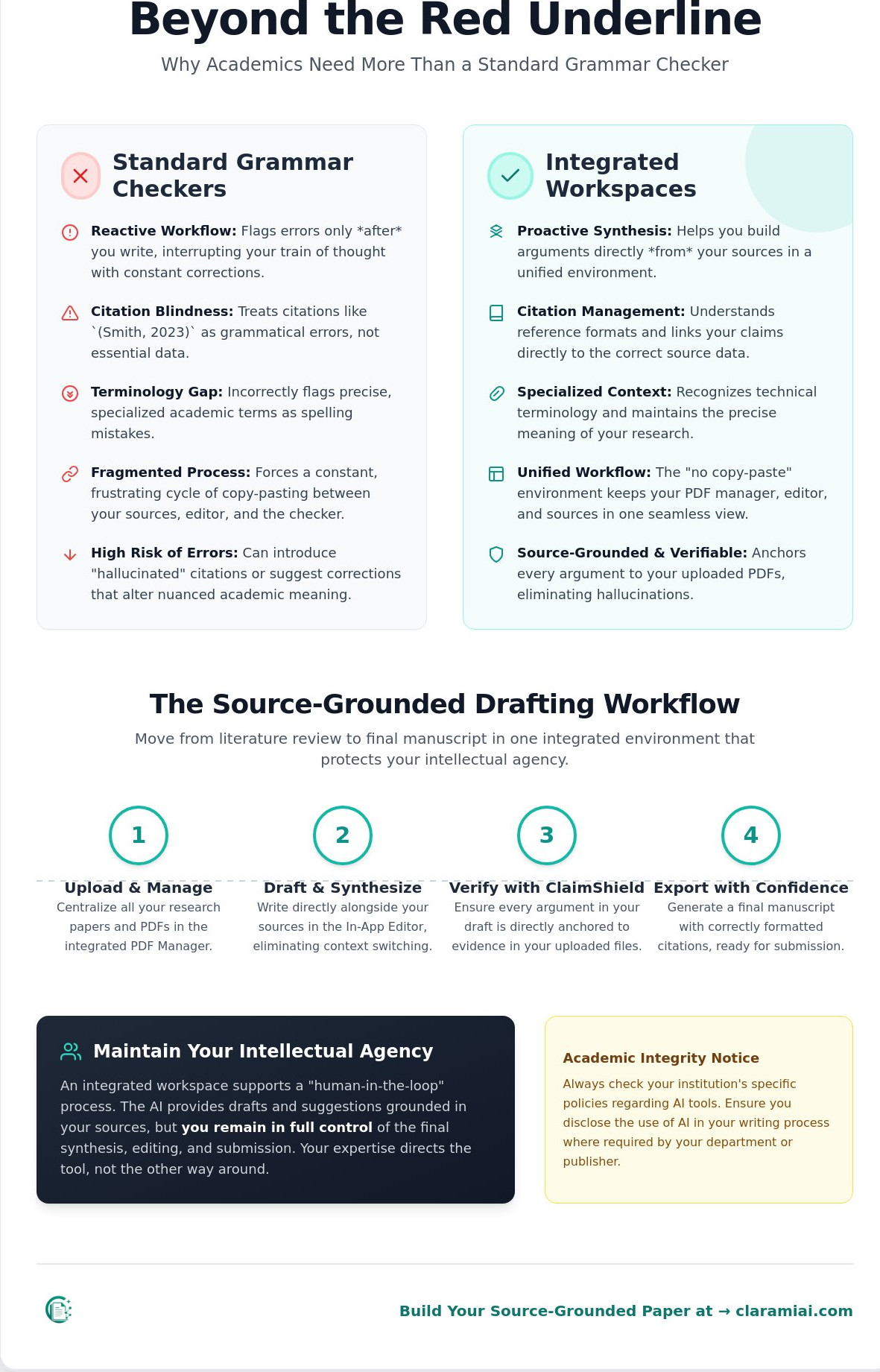
### The technical terminology gapGeneral-purpose dictionaries are optimized for common usage. In specialized fields like biochemistry or theoretical physics, specific nomenclature is often flagged as an error by standard software. You end up spending more time clicking "Ignore" or "Add to Dictionary" than actually writing your draft. These corrective suggestions can even alter the scientific meaning of a sentence by replacing a precise technical term with a generic synonym that doesn't carry the same weight. Manual overrides in these tools waste more time than they save for professional researchers who require absolute precision.
Citation awareness vs. citation management
Most checkers treat citations as simple strings of text. They don't recognize the structural necessity of a DOI or the specific punctuation required by APA, Chicago, or LaTeX formats. A general tool might try to "fix" an in-text citation like (Author, Year) by turning it into a sentence fragment or removing the comma. True scholarly work requires a specialized workspace that understands references as data points. You need a system that links your claims directly to the source material rather than one that just checks for misplaced commas.
Academic Integrity Notice: Always check your institutional policies regarding AI tools. Ensure you disclose the use of AI in your writing process where required by your department, university, or publisher methodology sections.
Comparing grammar tools with integrated research workspaces
Most writing software functions as a reactive layer. You write a sentence, and the tool judges it. This creates a fragmented workflow where you are constantly interrupted by red underlines while trying to maintain a complex train of thought. A grammarly alternative for academics should do more than just flag passive voice. It should support the entire lifecycle of a research paper. Integrated research workspaces represent a shift from correction to synthesis. They provide a structural foundation where your drafting and your evidence coexist in a single interface.
The primary friction in scholarly writing is context-switching. You likely spend hours moving text between a PDF reader, a web-based chat box, and a document editor. Every time you switch tabs, you lose focus. This fragmentation also increases the risk of data loss or incorrect attribution. A unified workspace removes this friction. By keeping your PDF Manager and In-App Editor in the same view, you maintain a direct connection to your data. This "no copy-paste" workflow ensures that your writing stays grounded in the actual evidence you've collected.
Reactive checking vs. proactive synthesis
Standalone grammar checkers are designed for the final stage of writing. They are useful for a last-minute polish, but they don't help you build an argument. In contrast, a workspace like Clarami is designed for the drafting phase. It allows you to anchor every sentence to a specific source highlight. This proactive synthesis means you aren't just fixing errors; you are substantiating claims as you write them. When considering academic integrity with AI writing tools, this level of traceability is essential. It ensures that the human researcher remains the primary architect of the argument while using technology to organize the underlying evidence.
Feature comparison: Checker vs. Workspace
While a standard checker focuses on syntax, a research workspace prioritizes structural integrity. You need tools that handle the heavy lifting of source management and initial drafting. For example, AutoDraft helps you move from disorganized notes to a structured first draft without losing your unique voice. You can compare the key differences in functionality below:
- Citation Handling: Checkers look for punctuation. Workspaces provide real-time reference linking and DOI verification.
- Organization: Checkers view documents in isolation. Workspaces utilize a PDF Manager to categorize and query your entire library.
- Drafting: Checkers suggest synonyms. Workspaces offer selection-level edits and templates matched to specific academic rubrics.
Choosing the right environment is a critical step in your methodology. For more guidance, you can review our criteria for choosing an AI research assistant tool. If you want to experience a more disciplined approach to your next paper, you can create a free account and begin building your workspace.
Academic Integrity Notice: Always check your institutional policies regarding AI tools. Ensure you disclose the use of AI in your writing process where required by your department or publisher.
Critical features for academic integrity and claim verification
For a scholar, the most dangerous error isn't a misplaced comma; it's an unsubstantiated claim. While general tools focus on linguistic aesthetics, a true grammarly alternative for academics must prioritize the structural integrity of your evidence. Research from experts like Les Perelman at MIT has long highlighted why general-purpose grammar checkers fall short when applied to complex academic writing. These tools lack the capacity to verify if a statement actually aligns with the data in your source material.
Traceability is the foundation of scholarly trust. In a specialized workspace, every sentence in your draft can be linked back to a specific page in your PDF library. This direct connection eliminates the anxiety of misattribution. If you need to double-check a methodology detail, you don't search through folders; you click the text in your editor. This methodical approach ensures that your final manuscript is a precise synthesis of verified data rather than a collection of generic observations.
ClaimShield and the end of hallucinations
General-purpose large language models often guess at facts based on their training data. This leads to hallucinations that can ruin a researcher's reputation. ClaimShield solves this by anchoring the drafting process to your uploaded PDFs. It acts as a verification layer that checks your arguments against the primary evidence you've collected. This mechanism is a vital part of verifying AI citations in professional research. By restricting the AI's scope to your specific library, you ensure that every suggestion is grounded in reality.
The human-in-the-loop philosophy
Academic writing requires a unique scholarly voice that an AI cannot replicate. A workspace should function as a collaborator, not a ghostwriter. This is why "suggest-mode" is the gold standard for drafting. Instead of generating entire essays, the tool offers paragraph-level refinements. You remain the primary architect of the argument. Selection-level editing allows you to rewrite specific sections for tone or clarity while keeping your original logic intact. Consider this typical workflow refinement:
- Original Draft: "The data shows that the cells grew faster when we added the protein."
- AI Suggestion: "Quantitative analysis indicates a statistically significant increase in cellular proliferation following the administration of the protein complex."
- Human Decision: You accept the suggestion but add a specific reference to the growth rate percentage found in your methodology PDF.
This approach respects your intellectual agency. You are not delegating your thinking; you are using a tool to assist with the cognitive labor of composition. By maintaining this human-in-the-loop standard, you satisfy the ethical requirements of modern academic production.
Academic Integrity Notice: Always check your institutional policies regarding AI tools. Ensure you disclose the use of AI in your writing process where required by your department or publisher.
Building a source-grounded drafting workflow from PDF to DOCX
The transition from gathering literature to producing a manuscript is often where the writing process stalls. If you only use a grammarly alternative for academics to check your final sentences, you're missing the opportunity to streamline the most difficult part of the job: synthesis. A source-grounded workflow treats your PDFs as the active foundation of your document rather than static files in a separate folder. This methodical approach ensures that your writing remains anchored in evidence from the first paragraph to the final reference list.
Centralizing your source material
Traditional research involves keeping your library in one application and your draft in another. This separation creates a constant cognitive load as you switch between windows. By uploading your collection to the Clarami workspace, you create a living repository where your evidence is always visible. The PDF Manager automatically extracts metadata, such as DOIs and publication dates, to build your citation list. This integration ensures that your sources are permanently connected to your In-App Editor. You don't have to search for a specific paper; you can query your entire library directly from your writing environment.
From research notes to first draft
Moving from a blank page to a structured argument requires a disciplined procedure. You can use the following steps to maintain momentum without sacrificing accuracy:
- Highlight and Extract: Identify key methodology points and data directly within your PDFs.
- Query the Assistant: Ask Clara to synthesize findings across multiple papers to identify common themes or contradictions.
- Apply Templates: Use structured templates that match your specific academic rubric, whether you are writing a thesis chapter or a journal article.
- Refine the Draft: Use AutoDraft to turn your synthesized notes into a cohesive first draft while maintaining a consistent academic writing tone.
This process keeps the human researcher in the loop. Clara provides the initial structure based on your uploaded evidence, but you remain responsible for editing the output to ensure it meets the rigorous standards of your field. When the draft is complete, the workspace maintains the structural integrity of your formatting. You can export your work directly to DOCX or LaTeX with your citations already verified and in place. This eliminates the need for a final, manual check of your reference list and prevents the common errors associated with standalone checkers.
If you're ready to move beyond simple grammar checking and build a more disciplined research habit, you can set up your integrated workspace today.
Academic Integrity Notice: Always check your institutional policies regarding AI tools. Ensure you disclose the use of AI in your writing process where required by your department or publisher.
Clarami: A methodical workspace for rigorous academic production
For the professional researcher or graduate student, the transition from a general-purpose editor to a specialized workspace is a matter of discipline. General-market software treats academic writing as just another text type; however, scholars know that a peer-reviewed paper requires a level of structural integrity that generic tools cannot provide. Clarami is built specifically for this rigor, positioning itself as the primary grammarly alternative for academics who value the substantiation of claims as much as the correction of syntax. By moving your work into a purpose-built environment, you replace fragmented tools with a unified system designed for scholarly labor.
Long-term research projects require a stable, organized environment. The Clarami SaaS model provides continuous cloud organization, ensuring that your literature reviews and drafts are accessible across multiple devices and sessions. This persistence is vital for doctoral candidates or faculty members working on multi-year studies. You aren't just writing a document; you're building a knowledge base that grows with your career. This methodical approach reduces the anxiety of disorganized folders and helps you maintain focus on your intellectual contributions.
Why specialized tools beat general platforms
A standard grammar checker might help you fix a split infinitive, but it won't help you build a cohesive argument across five chapters. The value of a purpose-built environment lies in its ability to maintain a permanent connection between your library and your prose. When you explore the features of Clara, you'll see a digital assistant designed to respect your intellectual agency. It doesn't replace your voice; it supports the cognitive labor of synthesis by keeping your source material within reach. This structural cohesion is what distinguishes a professional AI writing tool for students and researchers from a simple spell-check plugin.
Getting started with your first project
Adopting a more disciplined workflow is straightforward. You begin by uploading your library to the PDF Manager. Once your sources are organized, you can use structured templates to outline your draft according to specific journal or university rubrics. During the composition phase, you can query your library for specific methodology details or data points using the Clara AI Assistant. Finally, use the Citation Generator to ensure your APA, Chicago, or MLA references are formatted with total precision. This structured approach ensures that your work is not only grammatically correct but also academically sound.
If you're ready to eliminate the stress of disorganized research and move toward a more precise writing process, you can create your free workspace today. By choosing a tool built by specialists for specialists, you ensure that your writing meets the highest standards of academic excellence.
Academic Integrity Notice: Always check your institutional policies regarding AI tools. Ensure you disclose the use of AI in your writing process where required by your department, university, or publisher.
Mastering the transition to a source-grounded research workflow
The evolution of scholarly writing in 2026 marks a definitive shift from simple linguistic correction to deep evidence synthesis. You've seen how general tools fail to respect the rigid requirements of technical nomenclature and citation structures. By adopting a grammarly alternative for academics that functions as a unified workspace, you eliminate the cognitive load of context-switching and the risks of manual data entry. You move from a state of disorganized notes to a polished manuscript with structural integrity and verified claims.
Success in modern research requires tools that respect your intellectual agency while providing a rigorous foundation for your arguments. With features like AutoDraft for source-grounded composition and ClaimShield for precise verification, you can ensure that every sentence in your draft is anchored in primary evidence. This integrated approach allows you to focus on your unique contributions while the software handles the organizational complexity of your PDF library and references.
Start your methodical research journey with Clarami today and experience a more disciplined, less stressful path to publication.
Academic Integrity Notice: Always check your institutional policies regarding AI tools. Ensure you disclose the use of AI in your writing process where required by your department or publisher.
Frequently asked questions
Is Clarami better than Grammarly for PhD students?
Clarami provides a specialized research environment that general tools lack. While Grammarly handles basic syntax for emails or short essays, Clarami integrates PDF management and source-grounded drafting. This is essential for a PhD workflow where you must synthesize complex data and maintain structural integrity across long-form manuscripts. It serves as a comprehensive grammarly alternative for academics by keeping your evidence connected to your prose at all times.
Can I use Clarami to verify my citations?
Yes, you can verify your citations using the Citation Generator and ClaimShield technology. Unlike general AI tools that might hallucinate references, ClaimShield ensures your arguments are anchored in real, verifiable sources from your uploaded library. This methodical approach allows you to substantiate every claim with a direct link to the original PDF. It provides a level of traceability that is required for high-stakes professional and scholarly research.
Does Clarami support LaTeX export?
Yes, Clarami supports exporting your verified drafts to LaTeX, DOCX, and PDF formats. This feature is designed specifically for professional researchers who need to maintain structural integrity when moving from a drafting workspace to a final publication platform. By supporting these academic standards, the In-App Editor ensures that your formatting remains consistent and precise regardless of your submission requirements. It is a purpose-built solution for rigorous scholarly production.
Will using an AI workspace get me in trouble for plagiarism?
Clarami emphasizes a human-in-the-loop philosophy to protect your academic integrity. You remain the primary architect of your work, using the assistant to suggest refinements rather than generate whole essays. Plagiarism is avoided because the tool anchors its suggestions in your own uploaded research. However, you should always check your specific university policies regarding AI tools and disclose their use in your methodology as required by your institution.
How does the PDF manager help with my literature review?
The PDF Manager allows you to move beyond simple folder organization to an intelligent research repository. You can categorize sources by project, highlight key evidence, and extract methodology directly into your workspace. The Clara assistant can then synthesize information across multiple documents simultaneously. This reduces the cognitive labor of your literature review by surfacing relevant data points and connections without the need for constant tab-switching or manual copy-pasting.
Related on Clarami
- Best AI writing tool for students (full guide) →
- AI academic integrity checklist →
- Clarami pricing: Free vs PRO vs Platinum →
- Editor vs ChatGPT for writing →
- Export DOCX, PDF, and hand-in checklist →
- How to outline a paper →
- Prompt to structured essay draft →
- Revise with AI on a selection →
- Sign up free →
- Clarami home →
- More guides on the Clarami blog →