
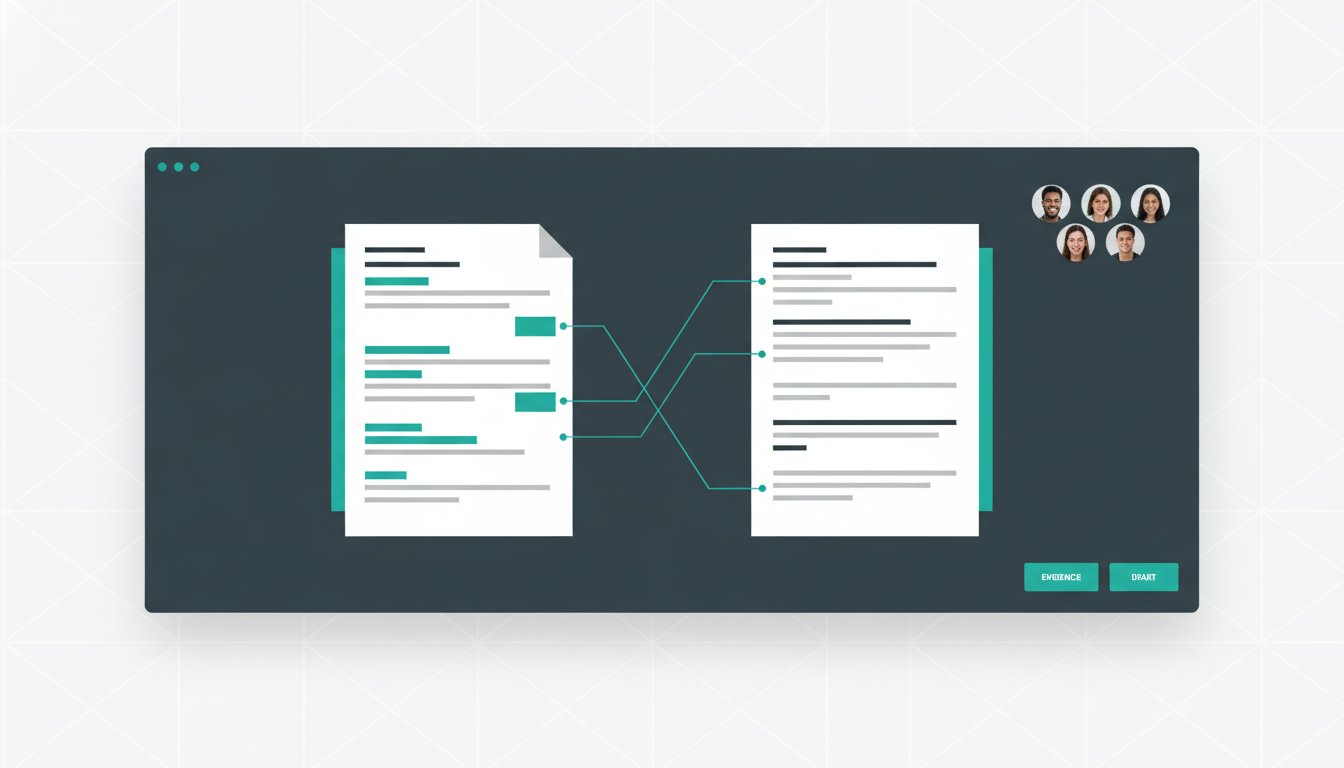
Best research writing workflow software for collaborative teams in 2026
Find the best research writing workflow software for your team. Learn how to unify evidence and prose to eliminate citation errors and the copy-paste tax.
Write with structure in Clarami AI
Editor-first AI drafting, citations, and two Workflows for student writing.
Why does adding more efficiency tools to your research stack often result in less actual writing time? Most collaborative teams spend hours managing the copy-paste tax between chat interfaces and document editors. You lose track of source evidence during the drafting phase. You face the anxiety of potential hallucinations. You struggle with citation errors that creep into shared documents. It's a fragmented process that drains intellectual energy and compromises the structural integrity of your work.
You deserve a system where your evidence and your prose live in the same workspace. This article explores how to select the right research writing workflow software to build a unified environment for your team. You'll learn to eliminate structural precision issues and maintain academic integrity through a human-in-the-loop approach. We will cover the transition from literature review to first draft using tools like PDF Manager and ClaimShield to ensure every statement is substantiated by primary sources.
Academic Integrity Disclaimer: Always check your institution's specific policies regarding AI assistance. You are responsible for the final accuracy and editing of your work. You should disclose the use of any writing tools where required by your department, school, or publisher.
Key Takeaways
- Identify the hidden costs of the "copy-paste tax" and how separating evidence from your draft leads to context loss.
- Evaluate the core requirements for research writing workflow software, focusing on metadata extraction and seamless PDF management.
- Compare collaborative editors and drafting platforms to distinguish between chat-based AI and integrated workspaces.
- Establish co-authorship protocols that use ClaimShield to anchor every argument in primary source data.
- Learn how to use AutoDraft to move from a literature review to a structured first draft while maintaining total intellectual agency.
Table of Contents
- The hidden costs of fragmented research writing workflows
- Selecting a foundation for reference management and PDF organization
- Comparing collaborative editors and AI-assisted drafting platforms
- Establishing protocols for co-authorship and academic integrity
- Streamlining the scholarly cycle with the Clarami workspace
The hidden costs of fragmented research writing workflows
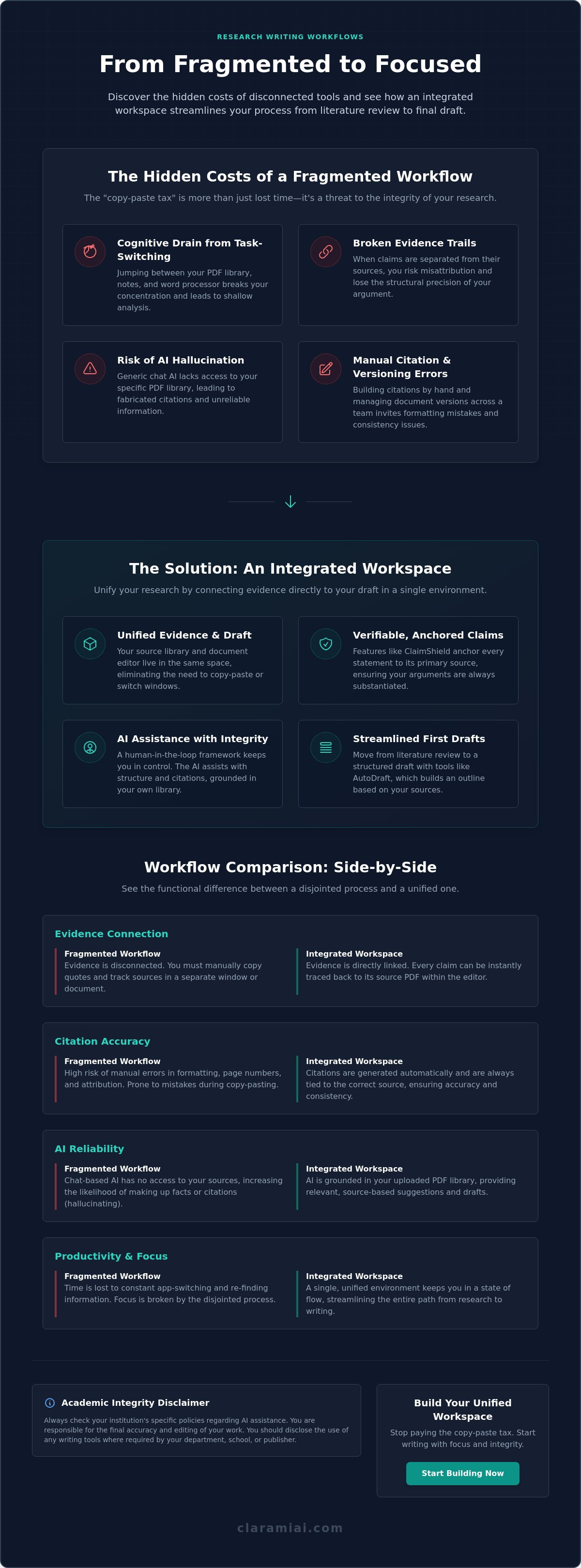
The traditional research process is often a series of disjointed steps. You find a source, save it to a manager, and then manually transfer excerpts to a document. This copy-paste tax is a significant drain on productivity. It's not just about the time lost; it's about the erosion of structural precision. When your evidence is disconnected from your draft, the risk of misattribution increases. Effective research writing workflow software should bridge this gap by anchoring every sentence to its source material. Teams often rely on a Comparison of reference management software to find tools that handle metadata, but many of these standalone apps fail to integrate with the actual writing environment.
General-purpose tools usually fail to meet the specific requirements of scholarly citation styles. They treat a bibliography as a final step rather than a foundational element of the writing process. This separation is why many collaborative teams struggle with version control and evidence tracking. By adopting specialized research writing workflow software, you ensure that the connection between a claim and its supporting data is never broken. This creates a functional bridge between your literature review and your manuscript.
To better understand how these tools fit into a modern academic cycle, watch this helpful video:
### The cognitive load of switching between research toolsConstant task-switching reduces the depth of your synthesis. When you jump between a PDF viewer and a word processor, your brain loses the thread of the argument. This leads to folder sprawl, where your annotated documents and active drafts become disconnected. A unified workspace solves this by centralizing your assets. It allows you to view methodology and data side-by-side with your prose, ensuring that your logic remains grounded in the evidence. You can explore how a centralized integrated workspace eliminates these interruptions.
Academic integrity and the risks of disconnected AI
Using generic chat-based AI presents a significant risk to scholarly rigor. These tools often lack access to your specific library of PDFs, leading to hallucinations or fabricated citations. Manual citation building in a separate document is equally dangerous. It invites avoidable errors in formatting and attribution. Maintaining intellectual agency requires a human-in-the-loop framework. In this model, you remain the primary editor while the software assists with the structural connection between claims and data. This approach ensures that every citation is verified and every argument is substantiated by primary sources.
Academic Integrity Disclaimer: Always check your institution's specific policies regarding AI assistance. You are responsible for the final accuracy and editing of your work. You should disclose the use of any writing tools where required by your department, school, or publisher.
Selecting a foundation for reference management and PDF organization
Choosing the right tool for source management is the first step in building a reliable research writing workflow software stack. While open-source options like Zotero or industry standards like Mendeley are common, they often operate as silos. These standalone tools require you to manually sync data between different windows. In 2026, a foundation must offer more than just file storage; it needs to provide metadata extraction that is both fast and accurate. The Clarami PDF Manager provides this unified foundation by linking your library directly to your drafting environment, which eliminates the need for external reference apps.
Three essential criteria define a modern system: cloud accessibility for teams, bidirectional syncing between the source and the editor, and the ability to verify claims in real time. Unlike older methods, your stack shouldn't require you to leave your document to check a source. Cloud accessibility is particularly vital for collaborative research teams who need to share annotations and source libraries across different time zones. This ensures that every co-author sees the same version of the evidence at the same time, preventing version control issues. Such connectivity is essential for any research writing workflow software intended for team use.
PDF management and annotation strategies
Effective annotation goes beyond highlighting text. You should focus on extracting methodology and specific data points directly from your PDF highlights. By using a searchable annotation database, you turn static PDF files into active research assets. This allows you to query your own notes as you write. Instead of tagging by author alone, try tagging by specific project milestones or logical arguments. This ensures that when you begin drafting, your evidence is already categorized by its utility. This methodical approach prevents the folder sprawl mentioned previously and keeps your intellectual labor organized within a single, coherent system.
Metadata accuracy and citation building
Metadata accuracy is non-negotiable. You must verify DOI and ISBN data during the initial collection phase to prevent citation errors later. Automated citation generators help support complex styles like APA, Chicago, and LaTeX, but they are only as good as the input data. For those in advanced programs, choosing the best software for phd students 2026 involves looking for tools that automate this verification. Many collaborative research writing platforms now prioritize this source-first approach to drafting. Using a built-in Citation Generator ensures that your bibliography is built as you write, rather than as a frantic final step.
If you're tired of manual data entry, you can start building your integrated library today with a tool that values structural integrity.
Comparing collaborative editors and AI-assisted drafting platforms
Most teams default to general-purpose editors, but these tools often lack the specialized features required for high-stakes scholarly work. When evaluating research writing workflow software, you must look beyond basic word processing. You need a system that understands the structural requirements of a dissertation or a peer-reviewed journal article. General tools like Google Docs offer excellent real-time collaboration but provide no grounding in your primary sources. Conversely, specialized tools like Scrivener offer great organization for long-form projects but lack the collaborative features and AI assistance necessary for modern research teams.
<table> <thead><tr><th>Feature</th><th>Google Docs</th><th>Scrivener</th><th>Clarami</th></tr> </thead> <tbody><tr><td>**Source Grounding**</td><td>None</td><td>Manual Links</td><td>Integrated (ClaimShield)</td></tr><tr><td>**Real-time Collaboration**</td><td>Native</td><td>None</td><td>Suggest-mode</td></tr><tr><td>**Selection-level AI**</td><td>None</td><td>None</td><td>Clara Assistant</td></tr><tr><td>**Academic Rubrics**</td><td>None</td><td>None</td><td>Built-in Templates</td></tr> </tbody></table>Integrated editors vs. chat interfaces
Copying and pasting from a separate chat box is a common error that breaks your research narrative. This fragmented approach forces you to manage two different contexts, which increases the likelihood of losing track of your source evidence. An integrated drafting environment allows you to perform selection-level edits. Instead of generating a whole document from a prompt, you can rewrite specific paragraphs or refine technical methodology while keeping your original voice intact. The Clarami workspace features demonstrate how this integration maintains a direct link between your draft and your PDF library. This prevents the context loss that occurs when you treat AI as a separate chat-based entity.
Collaborative drafting for co-authors
Managing a manuscript with multiple co-authors requires more than just shared access. You need a robust suggest-mode that functions similarly to an advisor-student feedback loop. This allows you to track changes and manage version history without the clutter of disconnected email threads. When committee members provide conflicting feedback, having a centralized version history helps you reconcile different perspectives. It's a methodical way to ensure every contributor's input is documented and addressed. This level of transparency is essential for maintaining the integrity of the collaborative process.
Templates matched to academic rubrics
Structured templates reduce the risk of structural errors in your final submission. By using headers and formatting pre-set to institutional standards, you can focus on the substance of your argument rather than the nuances of margin sizes or font choices. These templates are matched to specific academic rubrics, ensuring that your methodology, results, and discussion sections meet the expected criteria. Remember that even with these tools, you remain the human-in-the-loop. You are responsible for the final editing and ensuring the work meets your school's specific requirements. This disciplined approach ensures that your research writing workflow software serves as a support system for your own intellectual labor.
Establishing protocols for co-authorship and academic integrity
Collaborative writing introduces unique risks to scholarly rigor. One researcher might contribute a paragraph while another handles the methodology. This fragmentation makes it difficult to maintain a single, verified chain of evidence. To solve this, your research writing workflow software must prioritize traceability over speed. You need a system that allows every team member to see exactly where a claim originated. For more detailed strategies, you can read our guide on coauthoring research papers. This level of transparency is essential for any research writing tool for students designed for team environments.
Verifying claims with source-grounded AI
Verification shouldn't be a separate, manual task performed at the end of the project. Using tools like ClaimShield allows you to verify statements against your specific PDF library as you draft. This process involves anchoring every argument in a primary source citation, ensuring that no co-author introduces unsupported claims. Source-grounded AI is a system that generates or verifies content using only the specific data found in your provided PDF library. By restricting the AI to your vetted sources, you eliminate the risk of hallucinations that plague general-purpose chat tools. This level of verification is a core feature of any professional research writing workflow software.
Maintaining a consistent academic tone
A common problem in collaborative research is the "patchwork" draft where different sections have conflicting voices. You can use a Draft Tone Checker to align sections written by different team members. This tool helps you refine the "AI tell" by using custom academic voice profiles that match your target publication. Focus on clarity and precision over complex vocabulary. Scholarly writing values the structural connection between a statement and its data, not just sophisticated phrasing. You remain the final judge of the prose, ensuring the human-in-the-loop requirement is met before submission.
Checklist for co-author review:
- Verify every claim against the primary PDF using ClaimShield.
- Check that the Citation Generator has mapped the correct page number.
- Run the Draft Tone Checker to align the voice with your target journal.
- Review selection-level edits for technical accuracy and intellectual agency.
You can create your collaborative workspace to start substantiating your claims with higher precision.
Academic Integrity Disclaimer: Always check your institution's specific policies regarding AI assistance. You are responsible for the final accuracy and editing of your work. You should disclose the use of any writing tools where required by your department, school, or publisher.
Streamlining the scholarly cycle with the Clarami workspace
Consolidating your research stack into a single workspace replaces at least five disconnected tools. You no longer need separate applications for PDF storage, citation management, chat-based AI, note-taking, and word processing. This integration is the hallmark of effective research writing workflow software. By housing these functions under one roof, you maintain a linear narrative from the first literature search to the final submission. It's a methodical approach that prioritizes the structural connection between your evidence and your prose.
The "no copy-paste" advantage
The traditional workflow requires constant window-switching. You copy a quote from a PDF, paste it into an editor, and then manually format the citation. This friction is eliminated when your PDF Manager sits directly beside your In-App Editor. Selecting text in your source material triggers specific research actions, such as summarizing a methodology or extracting data points, without leaving the page. Automated citation building happens within the editor, ensuring that every excerpt is linked to its metadata immediately. This "no copy-paste" approach preserves your cognitive focus and reduces the risk of accidental plagiarism or misattribution.
From research notes to verified drafts
Moving from a synthesis matrix to a first draft is often the most difficult transition in the scholarly cycle. Clara acts as a source-grounded assistant during this phase. Instead of asking general questions, you can ask Clara to extract specific methodologies or comparison points from your vetted library. This ensures that the resulting AutoDraft is grounded in evidence rather than generic data. The software assists with the heavy lifting of organization, but you remain the primary architect of the argument.
The final stage of the workflow relies on your intellectual agency. You use the Draft Tone Checker to ensure consistency and refine the prose to meet institutional standards. This human-in-the-loop requirement is what distinguishes professional research writing workflow software from consumer-grade automation. You are responsible for the final accuracy and the logical flow of the manuscript. The software simply ensures that the structural integrity of the build is maintained through every iteration.
If you're ready to consolidate your process and eliminate fragmented tools, you can explore the Clarami workspace to see how an integrated environment supports your research goals.
Academic Integrity Disclaimer: Always check your institution's specific policies regarding AI assistance. You are responsible for the final accuracy and editing of your work. You should disclose the use of any writing tools where required by your department, school, or publisher.
Building a unified research ecosystem
Transitioning to specialized research writing workflow software eliminates the cognitive friction of fragmented tools. You've explored how a unified workspace prevents context loss and protects the structural integrity of your arguments. By integrating your PDF library directly with your editor, you ensure every claim is substantiated and every citation is accurate. This methodical approach allows your team to focus on synthesis rather than manual data management.
You remain the essential human-in-the-loop. While tools like the source-grounded Clara AI assistant and automated APA and Chicago citations provide a foundation, your intellectual agency is the final arbiter of quality. Consolidating your workflow with an integrated PDF manager and editor creates a reliable environment for scholarly labor. Your research is too important to be stalled by disorganized tools. You can build a more efficient process that respects your intellectual agency today.
Academic Integrity Disclaimer: Always check your institution's specific policies regarding AI assistance. You are responsible for the final accuracy and editing of your work. You should disclose the use of any writing tools where required by your department, school, or publisher.
Build your intelligent research workspace with Clarami
Frequently asked questions
What is research writing workflow software?
Research writing workflow software is a specialized suite of tools that integrates reference management, PDF organization, and document editing into a single environment. This software streamlines the transition from data collection to final drafting by maintaining a unified database for all scholarly assets. By centralizing these functions, you reduce the cognitive load of switching between disconnected platforms and maintain a verified chain of evidence throughout your project.
Can I use AI for collaborative research while maintaining integrity?
Yes, provided you use technology as a supportive tool for organization and drafting rather than a generator of unverified content. You should follow a human-in-the-loop framework where you remain responsible for the final manuscript and submission. Always disclose your use of writing tools and verify every AI-suggested claim against primary sources according to your institution's specific policies and ethical standards.
How do integrated editors differ from chat-based AI interfaces?
Integrated editors allow you to interact with drafting assistants directly within your document workspace using your specific source library as context. This eliminates the need to copy and paste text between different windows. Because the research writing workflow software remains anchored to your data, it stays grounded in your research, which significantly reduces the risk of hallucinations or fabricated citations.
What is the best way to manage co-author feedback and verify claims?
The most effective method is to use a collaborative editor with suggest-mode and centralized PDF access to ensure every contributor works from the same evidence. Assign specific sections to authors and use verification tools to link sentences directly to source highlights. Every factual claim should be traceable back to the original evidence in your shared library to protect the project's structural integrity and academic rigor.
How does an integrated workspace improve citation accuracy?
An integrated workspace combines citation generators with a full-featured document editor, building your bibliography automatically as you write. This workflow ensures that metadata is captured the moment you extract a methodology or data point from a PDF. By using selection-level edits and real source data, you avoid the manual entry errors and formatting inconsistencies common in traditional reference managers.
Academic Integrity Disclaimer: Always check your institution's specific policies regarding AI assistance. You are responsible for the final accuracy and editing of your work. You should disclose the use of any writing tools where required by your department, school, or publisher.
Related on Clarami
- Best AI writing tool for students (full guide) →
- AI academic integrity checklist →
- Clarami pricing: Free vs PRO vs Platinum →
- Editor vs ChatGPT for writing →
- Export DOCX, PDF, and hand-in checklist →
- How to outline a paper →
- Prompt to structured essay draft →
- Revise with AI on a selection →
- Sign up free →
- Clarami home →
- More guides on the Clarami blog →