
Best pdf annotation tool for researchers: 2026 selection guide
Find the best pdf annotation tool for researchers with our 2026 guide. Compare options to link annotations to sources and streamline your academic writing.
Write with structure in Clarami AI
Editor-first AI drafting, citations, and two Workflows for student writing.
Annotation is not a final step; it is a bridge to composition that must maintain a permanent link to source evidence. When you highlight a critical passage, you are not just marking text. You are selecting the foundation for a future argument. Finding the best pdf annotation tool for researchers in 2026 requires looking beyond simple digital ink. You need a system that ensures your evidence remains anchored to its primary source from the moment of discovery to the final draft.
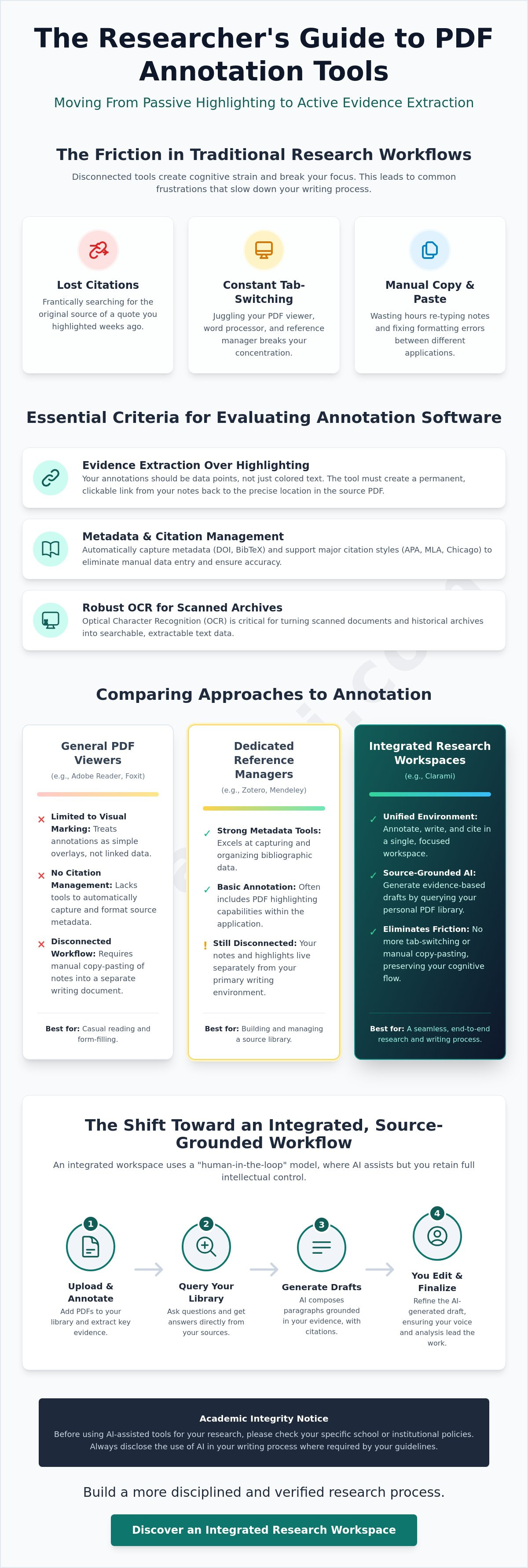
It's frustrating to lose track of where a specific quote originated or to spend hours manually re-typing notes from a PDF into your workspace. You likely feel the strain of disconnected tools that force you to switch tabs constantly, breaking your cognitive flow. This guide evaluates the most effective tools for extracting evidence while maintaining structural integrity in your scholarly writing. We will compare industry standards like Adobe and Foxit with integrated workspaces like Clarami to help you build a more disciplined, verified research process. By the end of this selection guide, you'll understand how to reduce annotation time by up to 70 percent while keeping your intellectual agency at the center of the work.
Academic Integrity Notice: Before using AI-assisted tools for your research, please check your specific school or institutional policies. Always disclose the use of AI in your writing process where required by your guidelines.
Key Takeaways
- Understand why the best pdf annotation tool for researchers must prioritize evidence extraction over simple marking to reduce your cognitive load.
- Evaluate software based on technical essentials, including cross-platform synchronization and OCR capabilities for your scanned archives.
- Compare established reference managers with visual mapping tools to determine which interface best supports your specific methodology.
- Identify how an integrated document editor eliminates the friction of tab-switching and manual copy-pasting during the writing process.
- Learn to implement a human-in-the-loop workflow that uses AI to query your source library and generate evidence-based drafts.
Table of Contents
- Why researchers need more than a digital highlighter
- Essential criteria for evaluating annotation software
- Comparison of leading PDF annotation tools for scholars
- The shift toward integrated research workspaces
- Implementing a source-grounded workflow with Clarami
Why researchers need more than a digital highlighter
Annotation is the first step of composition. It's the process of transforming a static document into a dynamic source of evidence. Most general-purpose viewers treat highlights as simple visual overlays. This is a mistake. For a systematic review, your annotations must function as data points. When you search for the best pdf annotation tool for researchers, you aren't just looking for a way to mark text. You're looking for a system that reduces the cognitive load of managing hundreds of sources. While a comprehensive list of PDF software provides many options for viewing files, researchers in 2026 require tools that facilitate systematic literature synthesis.
Academic Integrity Notice: Before using AI-assisted tools for your research, check your specific school or institutional policies. Always disclose AI use where required by your guidelines.
To better understand how specific tools handle these research workflows, watch this helpful video:
### The difference between reading and active researchPassive highlighting is a graveyard for forgotten thoughts. You mark a sentence, move on, and eventually lose the context of why it mattered. Active research demands extraction. Every highlight should be anchored to its page-level source. If you can't immediately jump back to the original evidence from your notes, your workflow is fractured. This disconnection often leads to "lost" citations and the stress of manual re-typing. Disorganized notes are a primary cause of unintentional plagiarism. The best pdf annotation tool for researchers solves this by maintaining a permanent, clickable link between your claims and the primary data. Accuracy is non-negotiable.
The role of metadata in scholarly annotation
Structural integrity depends on metadata. A tool that ignores DOI and BibTeX integration is a liability in a professional environment. You don't have time to manually enter publication years or author names for every source. Your workspace should automate this capture process. It must support standard citation styles without requiring external plugins. Common requirements include:
- APA 7th Edition: For social sciences and education.
- Chicago Manual of Style: For history and humanities.
- MLA: For literature and cultural studies.
Using a specialized tool like the Clara AI Assistant allows you to query your own PDF library while keeping this metadata attached to every response. This ensures your writing remains source-grounded and verifiable. Systematic order is the only way to handle the increasing volume of scholarly data in 2026.
Essential criteria for evaluating annotation software
Selecting the best pdf annotation tool for researchers requires a rigorous assessment of technical infrastructure. It's not enough for a tool to look modern. It must handle the heavy lifting of a multi-year project without data loss or synchronization lag. Your workflow likely spans multiple devices. You might highlight a methodology on a tablet during fieldwork and then refine that analysis on a desktop. Reliable cross-platform synchronization ensures your insights are always available where you write.
Structural integrity also depends on how the tool handles non-digital sources. Many historical archives or older journal articles exist only as scanned images. Without robust Optical Character Recognition (OCR) capabilities, these documents remain static pictures. You can't search them, and you can't extract their text. High-quality OCR transforms these archives into searchable, interactive data points. Once your text is digitized, you need export flexibility. The ability to move your notes into a word processor without formatting errors saves hours of manual correction. If you want to see how these technical requirements fit into a unified workspace, you can create a research account to test these features in practice.
Search and retrieval across your library
Searching a library of 500+ annotated PDFs shouldn't feel like a chore. You need a tool that performs full-text searches within your own annotations, not just the original document text. This allows you to find your own previous interpretations and connections instantly. Effective retrieval also relies on sophisticated tagging systems. By tagging evidence according to specific themes or theoretical frameworks, you can conduct thematic literature reviews with higher precision. Understanding how to organize research references is the first step toward building a library that remains useful throughout your career.
Collaboration and suggest-mode features
Research is a collaborative labor. You'll often need to share your annotated PDFs with supervisors or co-authors for feedback. Standard commenting tools are frequently insufficient for this level of academic rigor. Look for tools that offer a suggest-mode. This feature lets collaborators propose changes or additions to your research notes without overwriting your original work. It creates a transparent record of the intellectual dialogue. Version control is equally vital for long-term longitudinal studies. It provides a chronological path of your synthesis, allowing you to track how your understanding of a complex subject has evolved over time. This systematic approach prevents the loss of early-stage insights as your project grows in scope.
Comparison of leading PDF annotation tools for scholars
Selecting the best pdf annotation tool for researchers requires balancing feature density with workflow speed. Standalone applications often excel in specific niches but fail to bridge the gap between reading and writing. Understanding these distinctions is essential for maintaining a disciplined research methodology. Your choice should reflect the specific technical requirements of your current project.
Zotero remains the gold standard for reference management. It provides a centralized database for your library and includes a robust internal reader for basic markup. If your priority is a massive, organized bibliography, Zotero is the logical starting point. LiquidText offers a different approach. It's designed for non-linear synthesis. You can pinch a document to bring two distant segments together or pull excerpts onto a visual workspace to map connections. This makes it an excellent choice for identifying thematic overlaps across disparate sources. It is frequently cited as the best pdf annotation tool for researchers who prioritize visual mapping over traditional lists.
Adobe Acrobat is a powerful, enterprise-grade solution. It offers deep editing and security features, but many scholars find it too heavy for daily research. The interface is cluttered with features irrelevant to academic extraction. Drawboard PDF is a superior option for stylus-heavy workflows. It's optimized for Windows and iPad, providing a natural inking experience that mimics physical paper. For those who need a more unified environment, the PDF Manager within Clarami integrates these annotation capabilities directly into your writing editor. This eliminates the need to switch between separate applications during the drafting phase.
Reference managers with built-in readers
The choice between Zotero 7 and Mendeley often centers on annotation-to-citation speed. Zotero's open-source ecosystem allows for extensive customization through plugins. Mendeley provides a more streamlined, social-oriented experience. Both tools automate the extraction of metadata, but they often struggle during the drafting phase. They act as repositories rather than active writing companions. As your cloud library grows to include several gigabytes of high-resolution PDFs, synchronization speed and storage costs become critical factors to monitor.
Specialized tools for non-linear research
LiquidText and MarginNote are built for high-complexity synthesis. They allow you to visualize the structural connection between evidence in different papers. This is vital for complex literature reviews where themes are not immediately obvious. These platforms have a significant learning curve. You must invest time to master their unique gestures and workspace layouts. If you require mobility, browser-based tools offer easier collaboration. Native desktop applications provide the stability needed for massive, 500-page documents. Choose the platform that aligns with your cognitive style.
The shift toward integrated research workspaces
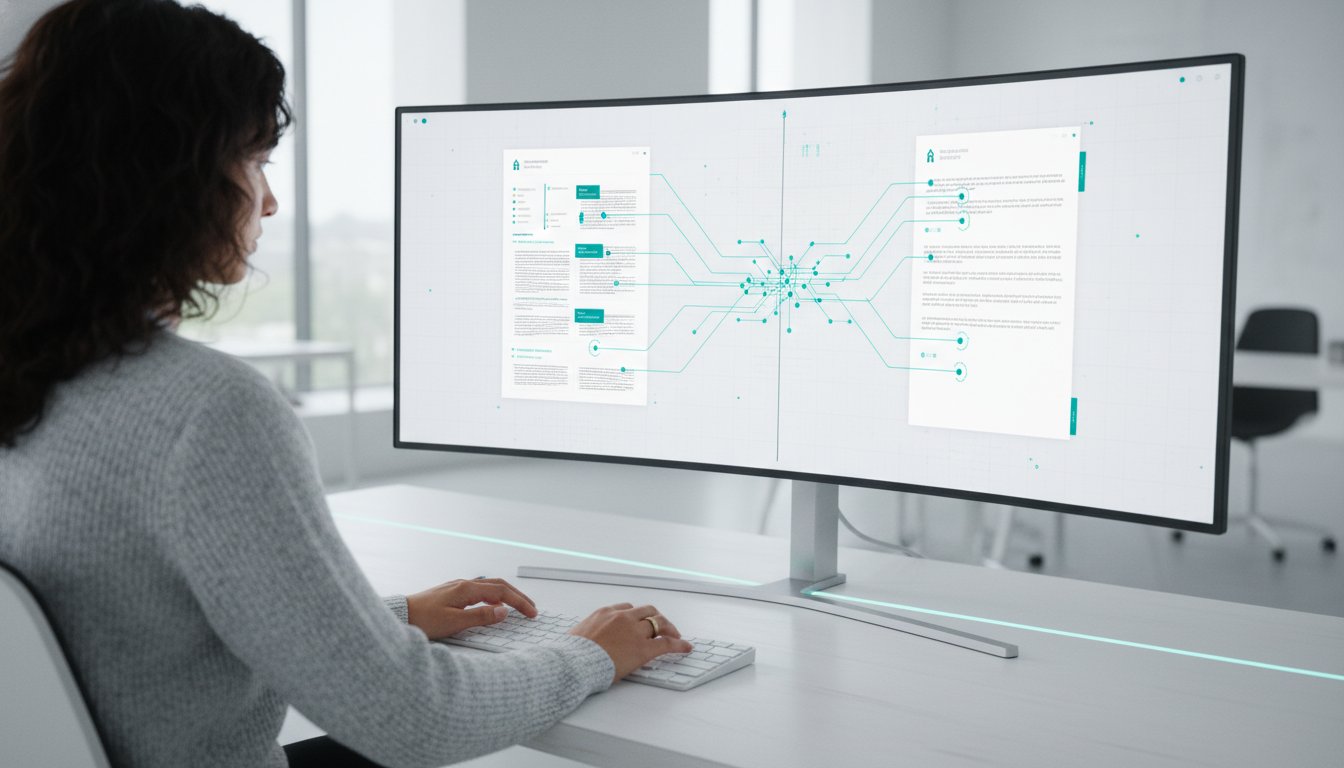
Traditional research workflows often accept fragmentation as a necessary burden. You read and annotate in one application, then switch to a separate word processor to begin your draft. This constant movement between windows creates a "copy-paste" tax that disrupts your cognitive flow and increases the risk of losing source-grounding. For many scholars, the best pdf annotation tool for researchers is no longer a standalone viewer. It is a unified environment where evidence extraction and composition occur in a single interface.
The "copy-paste" problem is more than a minor inconvenience. Every time you manually move a quote or summary from a PDF into a separate document, you risk losing the connection to the original page number or citation metadata. This fragmentation makes verification difficult and invites technical inaccuracies. An integrated approach solves this by providing a side-by-side view. The Clarami workspace connects your evidence directly to your draft, ensuring that every claim remains anchored to its primary source. To see how this unified workflow can simplify your next project, you can get started with a free account.
Academic Integrity Notice: Before using AI-assisted writing tools, check your specific institutional policies. You are responsible for disclosing AI use where required and ensuring your final submission meets all academic standards.
Eliminating the friction of tab-switching
A unified view allows you to see your PDF and your draft simultaneously. This eliminates the need for constant tab-switching, which helps maintain your focus during intense synthesis tasks. Within this workspace, you can perform selection-level edits. You can select a specific paragraph in your PDF to summarize or rewrite directly into your editor without leaving the screen. As you move these notes into your document, the system builds the citation automatically. This process ensures that your bibliography grows alongside your narrative, rather than being an afterthought that requires hours of manual correction.
Transitioning from highlights to a first draft
Moving from a collection of highlights to a coherent narrative is the most difficult phase of scholarly writing. Integrated workspaces facilitate this transition through structured templates matched to specific academic rubrics. These templates guide you from a raw synthesis matrix toward a logical, evidence-based argument. By maintaining a "human-in-the-loop" approach, you remain the primary decision-maker. The AI provides structured drafts based on your annotations, but you are responsible for the final synthesis and verification. This methodical progression ensures that every paragraph you write is substantiable and properly cited. This systematic order is essential for producing high-quality work that meets the rigors of modern academia.
Implementing a source-grounded workflow with Clarami
The final phase of a systematic review is the transition from raw data to a substantiated narrative. While many applications offer generic summarization, the best pdf annotation tool for researchers must provide a mechanism for verification. Clarami achieves this through a suite of purpose-built features that treat your PDF library as the sole source of truth. By using the Clara AI Assistant, you can query your uploaded documents to extract specific methodologies or data points. This process ensures that your insights are never disconnected from the evidence.
Once your evidence is organized, AutoDraft assists in generating initial sections based on your annotations. This is not an automated ghostwriting service. It is a structured drafting aid that requires your active oversight. You remain the primary decision-maker. After generating a draft, ClaimShield provides a layer of structural integrity that generic tools lack. It verifies every generated sentence against your primary sources, highlighting the exact page and paragraph used for substantiation. This methodical approach eliminates the risk of hallucinations and ensures your work is entirely source-grounded.
Academic Integrity Notice: Always consult your institution’s guidelines regarding the use of AI in scholarly work. Disclosure of AI assistance is a standard requirement in many academic environments. You are responsible for the accuracy and submission of your final manuscript.
Verifying claims against your primary sources
Research integrity depends on the ability to substantiate every claim. ClaimShield prevents inaccuracies by anchoring the AI in your specific data. It offers a sentence-by-sentence approval process. You review each claim, verify the source citation, and then accept or refine the text. This "human-in-the-loop" workflow maintains your intellectual agency while accelerating the synthesis process. As you approve sentences, the system builds your bibliography automatically from your PDF annotations. This ensures that your final list of references is perfectly synchronized with your in-text citations.
Refining your scholarly voice
A professional academic register is essential for publication. The Draft Tone Checker allows you to evaluate your manuscript for objectivity and precision. This is particularly useful for ESL writers who need to adjust drafts for linguistic clarity while maintaining the complexity of their original arguments. The tool focuses on the structural connection between your statements and your supporting data. Once the draft meets your standards, you can export the final document to DOCX or LaTeX with all citations intact. This prepares your manuscript for submission with precise formatting, allowing you to focus on the content rather than the technical overhead of citation management.
Building a sustainable research methodology
Scholarly writing requires a disciplined approach to evidence. You have seen that the best pdf annotation tool for researchers must do more than display text; it must facilitate the systematic extraction of data while maintaining the structural integrity of your citations. By moving away from fragmented, multi-app workflows, you protect your cognitive focus and reduce the risk of technical inaccuracies.
The transition to an integrated workspace ensures your arguments remain anchored in verified sources. With a side-by-side PDF manager and editor, you can move from synthesis to drafting without the friction of manual re-typing. Features like ClaimShield verification technology and the automated APA/Chicago citation builder provide the calm assurance that your work meets professional standards. This methodical progression from raw data to a polished draft respects your intellectual agency while simplifying the most rigorous aspects of academic labor.
Academic Integrity Notice: Always check your institutional policies regarding AI tools and disclose their use as required by your school or publisher. You remain responsible for the accuracy and originality of your final submission.
Start your research draft with Clarami for free
Your insights are the most important part of the research process. With a reliable system in place, you can focus on the complex analysis that defines your unique contribution to your field.
Frequently Asked Questions
What is the best PDF annotation tool for PhD students?
The best pdf annotation tool for researchers at the doctoral level is one that integrates reference management with a dedicated writing space. While Zotero is excellent for bibliographic storage, a unified workspace like Clarami allows you to extract evidence and write your dissertation in a single view. This reduces the risk of citation loss during long-term projects. Success in doctoral research depends on structural integrity and the ability to retrieve page-level evidence instantly.
Can I use AI to annotate PDFs without violating academic integrity?
You can use AI for annotation ethically by focusing on data extraction and synthesis rather than content generation. The "human-in-the-loop" model ensures you remain the primary author while the AI assists with organizing your PDF library. It's critical to check your specific school policies regarding AI use. Always disclose your methodology and ensure that all final arguments are your own, substantiated by the primary sources you've annotated.
How do I move my highlights from a PDF into a Word document with citations?
Moving highlights traditionally requires exporting your notes as Markdown or BibTeX files and then manually inserting them into Word. This process is often prone to formatting errors. A more efficient method involves using an integrated PDF Manager that sits alongside your document editor. This setup allows you to select annotated text and insert it directly into your draft. The system builds the APA or Chicago citation automatically, keeping your bibliography synchronized with your evidence.
Is there a tool that lets me search across all my PDF annotations at once?
Yes, advanced research platforms allow for library-wide annotation searches. This feature is vital when managing a literature review with hundreds of sources. By using a centralized PDF Manager, you can find specific themes or keywords across all your notes simultaneously. This capability transforms a collection of static files into a searchable database of your own intellectual insights. It eliminates the need to open individual documents to find a forgotten quote.
What is the difference between a PDF editor and a research workspace?
A PDF editor is designed for modifying the visual or structural elements of a file, such as adding signatures or rearranging pages. In contrast, a research workspace is built for the cognitive process of composition. It prioritizes the link between source evidence and your draft. While an editor treats a document as a standalone file, a workspace treats it as a data source that informs your writing through integrated citation helpers and side-by-side viewing.
How can I verify that my AI-generated research draft is factually accurate?
You can verify factual accuracy by using claim-checking technology that anchors AI outputs in your specific uploaded documents. Tools like ClaimShield provide a sentence-by-sentence verification process. This allows you to see the exact page and paragraph used to substantiate a statement. By reviewing these citations manually, you ensure that your research draft remains grounded in verified evidence. This methodical verification prevents the hallucinations often found in general-purpose AI tools.
Related on Clarami
- Best AI writing tool for students (full guide) →
- AI academic integrity checklist →
- Clarami pricing: Free vs PRO vs Platinum →
- Editor vs ChatGPT for writing →
- Export DOCX, PDF, and hand-in checklist →
- How to outline a paper →
- Prompt to structured essay draft →
- Revise with AI on a selection →
- Sign up free →
- Clarami home →
- More guides on the Clarami blog →