
Can I summarize full PDFs or selected sections?
Yes. You can work at full-document or targeted-section level.
Summarization formats
Clarami helps you turn dense PDFs into actionable summaries that feed directly into outlines, sections, and cited drafting.
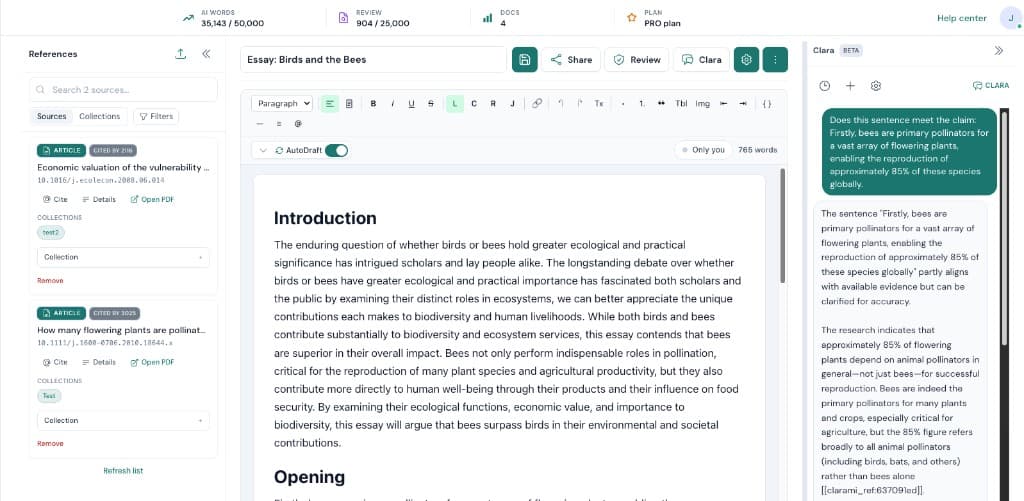
When you are working on AI PDF summarizer for academic and research workflows, the bottleneck is rarely typing speed. Most of the time it is coordination. Clarami AI keeps outlines, drafts, PDFs, citation tools, and advisory checks in one intelligent research workspace so you can see how each change affects the argument you plan to submit.
Suggested flow: Upload or reference PDF source material. Next, generate concise or expanded summary output. When you are satisfied, use selected insights in your active draft sections. Repeating that loop inside the same saved document is how teams avoid last-minute citation gaps and keep export settings consistent.
Why this setup helps: Extract key points from long PDF readings faster. Compare summarized evidence across multiple sources. Move insights straight into your manuscript workflow. If you are unsure where to begin, pick a short excerpt, refine it, then expand outward once tone and sourcing match your course, journal, or client expectations.
Support
Yes. You can work at full-document or targeted-section level.
Yes. Summaries can be used to plan and structure outline sections.
No. It accelerates review, but final claims should still be verified.
Related resources
Use Clarami AI to generate, refine, and export in one workflow.