Research workflows

AI Humanizer for researchers

Tighten manuscript prose for journal submission tone, smooth methods sections, and keep voice consistent across multi-author drafts — without touching a single citation, equation, or page reference.

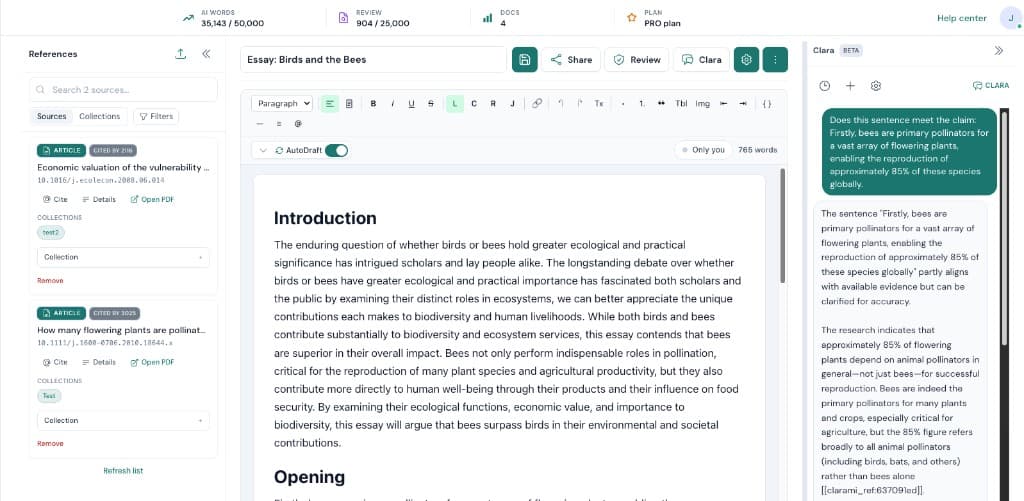
Clarami research workspace with editor, sources, and writing tools

Deep dive: AI Humanizer for researchers

When you are working on AI Humanizer for researchers, the bottleneck is rarely typing speed. Most of the time it is coordination. Clarami AI keeps outlines, drafts, PDFs, citation tools, and advisory checks in one intelligent research workspace so you can see how each change affects the argument you plan to submit.

Suggested flow: Select a paragraph from your manuscript draft in the workspace. Next, run Humanize from the section AI toolbar. When you are satisfied, compare the side-by-side preview, accept the revision, or run it again. Repeating that loop inside the same saved document is how teams avoid last-minute citation gaps and keep export settings consistent.

Why this setup helps: Vary sentence rhythm in passages that read as dense or repetitive. Replace vague academic-AI vocabulary with discipline-appropriate verbs and concrete terms. Preserve every citation, statistic, equation, and reference marker verbatim. If you are unsure where to begin, pick a short excerpt, refine it, then expand outward once tone and sourcing match your course, journal, or client expectations.

Our mission

For the reviewer, not for a detector

Humanize is built to make manuscript prose read the way published academic writing reads: scholarly hedges where genuine uncertainty exists, committed claims where evidence supports them, and structural irregularity instead of formulaic parallelism. The goal is the reviewer reading at 11pm — not a third-party AI-detection score.

Support

Researcher FAQs

Will it change my statistics, equations, or page references?

No. The Humanize prompt explicitly preserves every citation, reference marker, quotation, name, date, statistic, and equation exactly as written. Argument order and section structure are kept intact.

Can it help with methods-section clarity?

Yes. Methods passages often suffer from generic transitions and repetitive sentence shape — Humanize varies rhythm and tightens vocabulary without changing the technical content.

Does it work across multi-author drafts?

Humanize uses the voice notes and optional writing-sample excerpt saved in Account → Defaults. For multi-author work, set those to reflect the agreed manuscript voice before running Humanize on contributed sections.

Is it appropriate to use on a manuscript I plan to submit?

Humanize is drafting assistance. You remain responsible for accuracy, citations, and your journal's or funder's policies on AI assistance. Verify every passage against the underlying sources before submission.

Why researchers use Humanize

  • Vary sentence rhythm in passages that read as dense or repetitive.
  • Replace vague academic-AI vocabulary with discipline-appropriate verbs and concrete terms.
  • Preserve every citation, statistic, equation, and reference marker verbatim.

How researchers use Humanize

  1. 1Select a paragraph from your manuscript draft in the workspace.
  2. 2Run Humanize from the section AI toolbar.
  3. 3Compare the side-by-side preview, accept the revision, or run it again.

Ready to move from ideas to a finished draft?

Use Clarami AI to generate, refine, and export in one workflow.

AI Humanizer for Researchers | Clarami AI