
Does Humanize change citations or figure references?
No. Citations, figure references, table callouts, statistics, equations, and quoted source language are preserved verbatim during the revision.
Professional workflows
Tighten policy briefs, technical reports, and white papers for the reader who actually has to act on them — clearer rhythm, precise wording, and a consistent voice that holds up under review.
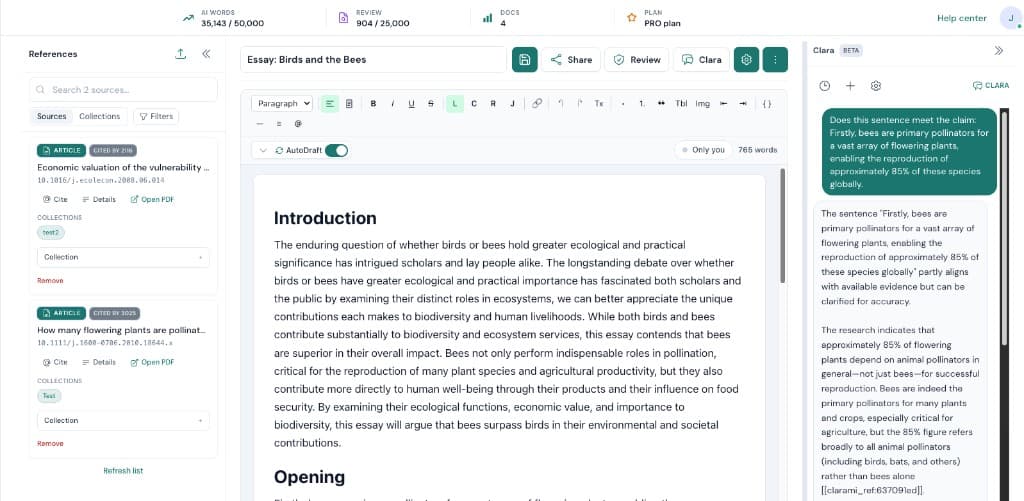
When you are working on AI Humanizer for professionals, the bottleneck is rarely typing speed. Most of the time it is coordination. Clarami AI keeps outlines, drafts, PDFs, citation tools, and advisory checks in one intelligent research workspace so you can see how each change affects the argument you plan to submit.
Suggested flow: Select a paragraph or section in your brief, report, or white paper. Next, run Humanize from the section AI toolbar. When you are satisfied, review the side-by-side suggestion, then accept, copy, or discard. Repeating that loop inside the same saved document is how teams avoid last-minute citation gaps and keep export settings consistent.
Why this setup helps: Replace generic abstractions with the specific terms your audience expects. Vary sentence length so dense paragraphs become readable without losing rigor. Preserve every citation, figure reference, and quoted source verbatim. If you are unsure where to begin, pick a short excerpt, refine it, then expand outward once tone and sourcing match your course, journal, or client expectations.
Our mission
In policy briefs, regulatory documents, and technical reports, the reader is making a decision — not grading prose. Humanize is built to remove the friction that gets between a careful argument and the person who needs it. Citations and source connections stay exactly where you placed them.
Support
No. Citations, figure references, table callouts, statistics, equations, and quoted source language are preserved verbatim during the revision.
Yes. Set your voice notes and optional writing-sample excerpt in Account → Defaults so Humanize applies the same target voice to every passage you run it on.
Humanize is drafting assistance. For regulatory or compliance documents, you remain responsible for verifying that the revised text still satisfies the underlying requirement — exactly as you would with any other editing pass.
Humanize is included on PRO and Platinum. Platinum is recommended for high-volume professional drafting since it includes unlimited AI words and the highest Clara limits.
Related resources
Use Clarami AI to generate, refine, and export in one workflow.